A collection of Computer Hardware, Software and other IT Tutorials

Monday, May 30, 2022

Win Innwa and Win Font Group Free Download (Myanmar Fonts Style)

Win Innwa and Win Font group are good to use for designing, publishing books with beautiful font style. It has become popular as it is useful and can solve many complicated Myanmar character issues. There are many types of Win Font style. Free download Win fonts and Myanmar fonts.

Share:

Friday, May 27, 2022

How to Check Your Computer has HDD or SSD on Windows 10/ 8/ 7 (Easy)?

In this post, we share how to check your computer is used HDD or SSD drive. The type of Hard Drive or the Internal storage drive installed on a computer can either be HDD (Hard Disk Drive) or SSD (Solid State Drive) type. The easiest way to check the type of Hard Drive or storage installed on a computer is to open the Defragmenter or Optimize Drives utility.

Share:

Wednesday, May 18, 2022

How to create multiple YouTube Channels under one Email address

In this post, we are going to share how to create multiple YouTube Channels under on Email address. This means that to create multiple channels, you need a starter Google account created using your email address. OK, let's see how it works.


Share:

Thursday, February 24, 2022

How to permanently delete Google Account (Google Account အပြီးဖျက်နည်း)

In this post, we are going to share how to permanently delete your Google Service or Google Account. After deleting the account, the account must have been deleted no more than 20 days ago and all its associated data, is permanently deleted, and Google cannot recover it.


Share:

Tuesday, February 22, 2022

Ready to use Photoshop PSD File for photo frame and religious ceremony

We would like to share a collection of Photoshop PSD file for photo frames and religious ceremony use. Check it out and use the link below to download the file. 


WinRAR File Size (83.6 MB)

Downloand

MEGA link >> https://mega.nz/file/J5tgmZIJ...

Credit to >> https://www.facebook.com/စွန်ရဲ-သား-နည်းပညာ-2022930344670291/

Share:

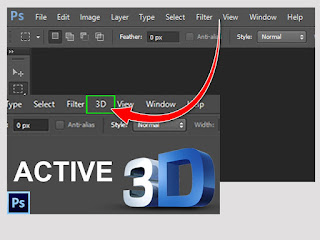
How to install and activate 3D for Adobe Photoshop CS6.

This post is shared for those who doesn't have 3D menu in Adobe Photoshop CS6. Some version of Adobe Photoshop CS6 didn't include 3D menu. This post instruct you how to activate 3D menu. Please see the instruction below. If you have any question, please leave the comment under the post.


>> How to download <<

WinRAR File Size (1.35 MB)
Downloand

MEGA link.....
https://mega.nz/file/spcW3bxY...


>> How to Install ထည့်သွင်းအသုံးပြုနည်း <<

1. After downloading the file.

2. Extract the file.

3. Click on the file and run as administrator

Credit to: https://www.facebook.com/စွန်ရဲ-သား-နည်းပညာ-2022930344670291/


Share:

Could not find this item, this is no longer located in …

Error Message: Could not find this item: This is no longer located in C:\Users\ …


Solutions: Use the Following Command to Delete the Problematic File

1. Search for “Command Prompt” and run as administrator.


2. Type this command, rd /s \\?\ FolderPaht to delete ( Example: rd /s \\?\C:Users\Sophean Un\... )

3. 1. Type “Y” to delete. And then the folder is deleting. DONE!


Share:

Thursday, November 25, 2021

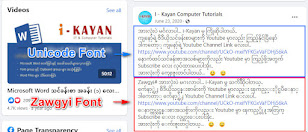
How to add both unicode and zawgyi font for being able to read in Google Chrome and Firefox.

How to add both unicode and zawgyi font for being able to read in computer browsers? If you use Pyidaungsu font or Myanmar Text font for reading and writing, you will not be able to read Zawgyi font in your browser. In this case, this post will guide you how to add both fonts. Please follow the instruction below.

How to add both Unicode and Zawgyi font for being able to read in Google Chrome Browser?

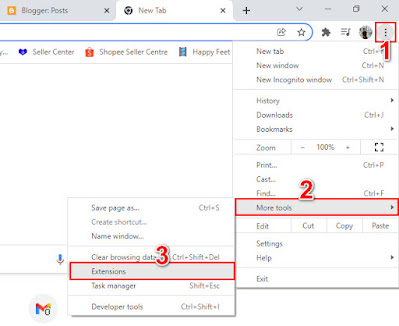
1. Open Google Chrome Browser. Click More icon which is on the top right of the browser Browser.

2. Click on More Tools and click on Extensions.


3. Extension windows tab will appear.
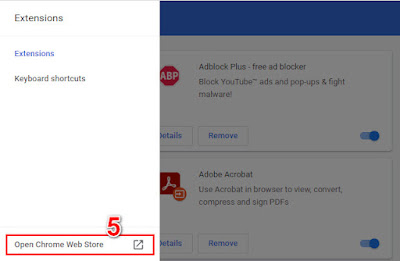
4. And then click on Extension's Main Menu Icon.
5. Click Open Chrome Web Store.
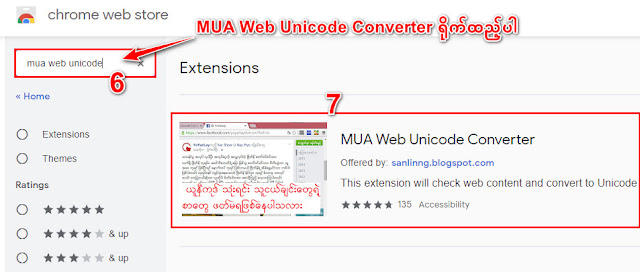
6. Find MUA Web Unicode Converter and click Enter button on your Keyboard.
7. Open MUA Web Unicode Converter from the extensions list.

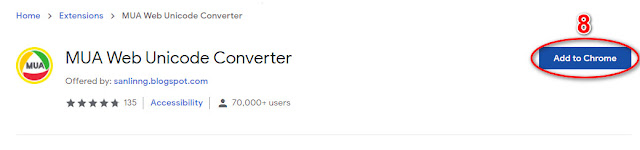
8. Click on Add to Chrome button to install extension.

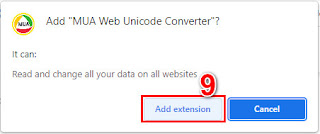
9. Then click on Add Extension button.


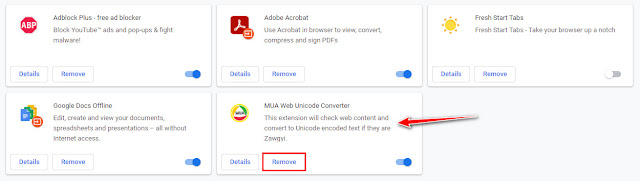
## Installation has been done. Please refresh your browser (or) restart your browser. 
## Please leave your comments if you have any question or any request for more contents.

Thank you!


Share:

Translate Website to your language

Featured Post

KMPlayer Latest Version Free Media Player for Windows, Mac OS, IOS and Android Free Download

KMPlayer is a versatile media player designed to support a wide range of audio and video formats. It provides high-quality playback with ex...

Total Pageviews